Controlul fin al luminozității monitorului în Windows 10
Sistemul de operare Windows 10 permite ajustarea nivelului de luminozitate al monitorului prin intermediul tastelor funcționale ale tastaturii. Atunci când se apasă tastele dedicate creșterii sau scăderii luminozității, sistemul ajustează aceasta cu anumite valori prestabilite. Din păcate, nu există posibilitatea de a controla cu precizie aceste valori implicite atunci când folosim butoanele dedicate. Pentru un control mai fin, utilizatorii pot folosi glisorul de luminozitate. Cu toate acestea, există o metodă alternativă, care permite ajustarea fină a luminozității prin intermediul tastaturii, folosind un script AutoHotkey.
Atenție: Pentru a înțelege mai bine acest proces, vă invităm să urmăriți tutorialul video din finalul acestui articol.
Pași pentru personalizarea nivelurilor de luminozitate
Înainte de a începe, asigurați-vă că aplicația AutoHotkey este instalată pe computerul dumneavoastră.
Deschideți un document nou în Notepad și copiați următorul cod. Acest script a fost creat de utilizatorul Reddit cu numele yet_another_usr:
 class BrightnessSetter {
; qwerty12 - 27/05/17
; https://github.com/qwerty12/AutoHotkeyScripts/tree/master/LaptopBrightnessSetter
static _WM_POWERBROADCAST := 0x218, _osdHwnd := 0, hPowrprofMod := DllCall("LoadLibrary", "Str", "powrprof.dll", "Ptr")

__New() {
if (BrightnessSetter.IsOnAc(AC))
this._AC := AC
if ((this.pwrAcNotifyHandle := DllCall("RegisterPowerSettingNotification", "Ptr", A_ScriptHwnd, "Ptr", BrightnessSetter._GUID_ACDC_POWER_SOURCE(), "UInt", DEVICE_NOTIFY_WINDOW_HANDLE := 0x00000000, "Ptr"))) ; Sadly the callback passed to *PowerSettingRegister*Notification runs on a new threadl
OnMessage(this._WM_POWERBROADCAST, ((this.pwrBroadcastFunc := ObjBindMethod(this, "_On_WM_POWERBROADCAST"))))
}

__Delete() {
if (this.pwrAcNotifyHandle) {
OnMessage(BrightnessSetter._WM_POWERBROADCAST, this.pwrBroadcastFunc, 0)
,DllCall("UnregisterPowerSettingNotification", "Ptr", this.pwrAcNotifyHandle)
,this.pwrAcNotifyHandle := 0
,this.pwrBroadcastFunc := ""
}
}

SetBrightness(increment, jump := False, showOSD := True, autoDcOrAc := -1, ptrAnotherScheme := 0)
{
static PowerGetActiveScheme := DllCall("GetProcAddress", "Ptr", BrightnessSetter.hPowrprofMod, "AStr", "PowerGetActiveScheme", "Ptr")
,PowerSetActiveScheme := DllCall("GetProcAddress", "Ptr", BrightnessSetter.hPowrprofMod, "AStr", "PowerSetActiveScheme", "Ptr")
,PowerWriteACValueIndex := DllCall("GetProcAddress", "Ptr", BrightnessSetter.hPowrprofMod, "AStr", "PowerWriteACValueIndex", "Ptr")
,PowerWriteDCValueIndex := DllCall("GetProcAddress", "Ptr", BrightnessSetter.hPowrprofMod, "AStr", "PowerWriteDCValueIndex", "Ptr")
,PowerApplySettingChanges := DllCall("GetProcAddress", "Ptr", BrightnessSetter.hPowrprofMod, "AStr", "PowerApplySettingChanges", "Ptr")

if (increment == 0 && !jump) {
if (showOSD)
BrightnessSetter._ShowBrightnessOSD()
return
}

if (!ptrAnotherScheme ? DllCall(PowerGetActiveScheme, "Ptr", 0, "Ptr*", currSchemeGuid, "UInt") == 0 : DllCall("powrprofPowerDuplicateScheme", "Ptr", 0, "Ptr", ptrAnotherScheme, "Ptr*", currSchemeGuid, "UInt") == 0) {
if (autoDcOrAc == -1) {
if (this != BrightnessSetter) {
AC := this._AC
} else {
if (!BrightnessSetter.IsOnAc(AC)) {
DllCall("LocalFree", "Ptr", currSchemeGuid, "Ptr")
return
}
}
} else {
AC := !!autoDcOrAc
}

currBrightness := 0
if (jump || BrightnessSetter._GetCurrentBrightness(currSchemeGuid, AC, currBrightness)) {
maxBrightness := BrightnessSetter.GetMaxBrightness()
,minBrightness := BrightnessSetter.GetMinBrightness()

if (jump || !((currBrightness == maxBrightness && increment > 0) || (currBrightness == minBrightness && increment < minBrightness))) {
if (currBrightness + increment > maxBrightness)
increment := maxBrightness
else if (currBrightness + increment < minBrightness)
increment := minBrightness
else
increment += currBrightness

if (DllCall(AC ? PowerWriteACValueIndex : PowerWriteDCValueIndex, "Ptr", 0, "Ptr", currSchemeGuid, "Ptr", BrightnessSetter._GUID_VIDEO_SUBGROUP(), "Ptr", BrightnessSetter._GUID_DEVICE_POWER_POLICY_VIDEO_BRIGHTNESS(), "UInt", increment, "UInt") == 0) {
; PowerApplySettingChanges is undocumented and exists only in Windows 8+. Since both the Power control panel and the brightness slider use this, we'll do the same, but fallback to PowerSetActiveScheme if on Windows 7 or something
if (!PowerApplySettingChanges || DllCall(PowerApplySettingChanges, "Ptr", BrightnessSetter._GUID_VIDEO_SUBGROUP(), "Ptr", BrightnessSetter._GUID_DEVICE_POWER_POLICY_VIDEO_BRIGHTNESS(), "UInt") != 0)
DllCall(PowerSetActiveScheme, "Ptr", 0, "Ptr", currSchemeGuid, "UInt")
}
}

if (showOSD)
BrightnessSetter._ShowBrightnessOSD()
}
DllCall("LocalFree", "Ptr", currSchemeGuid, "Ptr")
}
}

IsOnAc(ByRef acStatus)
{
static SystemPowerStatus
if (!VarSetCapacity(SystemPowerStatus))
VarSetCapacity(SystemPowerStatus, 12)

if (DllCall("GetSystemPowerStatus", "Ptr", &SystemPowerStatus)) {
acStatus := NumGet(SystemPowerStatus, 0, "UChar") == 1
return True
}

return False
}

GetDefaultBrightnessIncrement()
{
static ret := 10
DllCall("powrprofPowerReadValueIncrement", "Ptr", BrightnessSetter._GUID_VIDEO_SUBGROUP(), "Ptr", BrightnessSetter._GUID_DEVICE_POWER_POLICY_VIDEO_BRIGHTNESS(), "UInt*", ret, "UInt")
return ret
}

GetMinBrightness()
{
static ret := -1
if (ret == -1)
if (DllCall("powrprofPowerReadValueMin", "Ptr", BrightnessSetter._GUID_VIDEO_SUBGROUP(), "Ptr", BrightnessSetter._GUID_DEVICE_POWER_POLICY_VIDEO_BRIGHTNESS(), "UInt*", ret, "UInt"))
ret := 0
return ret
}

GetMaxBrightness()
{
static ret := -1
if (ret == -1)
if (DllCall("powrprofPowerReadValueMax", "Ptr", BrightnessSetter._GUID_VIDEO_SUBGROUP(), "Ptr", BrightnessSetter._GUID_DEVICE_POWER_POLICY_VIDEO_BRIGHTNESS(), "UInt*", ret, "UInt"))
ret := 100
return ret
}

_GetCurrentBrightness(schemeGuid, AC, ByRef currBrightness)
{
static PowerReadACValueIndex := DllCall("GetProcAddress", "Ptr", BrightnessSetter.hPowrprofMod, "AStr", "PowerReadACValueIndex", "Ptr")
,PowerReadDCValueIndex := DllCall("GetProcAddress", "Ptr", BrightnessSetter.hPowrprofMod, "AStr", "PowerReadDCValueIndex", "Ptr")
return DllCall(AC ? PowerReadACValueIndex : PowerReadDCValueIndex, "Ptr", 0, "Ptr", schemeGuid, "Ptr", BrightnessSetter._GUID_VIDEO_SUBGROUP(), "Ptr", BrightnessSetter._GUID_DEVICE_POWER_POLICY_VIDEO_BRIGHTNESS(), "UInt*", currBrightness, "UInt") == 0
}

_ShowBrightnessOSD()
{
static PostMessagePtr := DllCall("GetProcAddress", "Ptr", DllCall("GetModuleHandle", "Str", "user32.dll", "Ptr"), "AStr", A_IsUnicode ? "PostMessageW" : "PostMessageA", "Ptr")
,WM_SHELLHOOK := DllCall("RegisterWindowMessage", "Str", "SHELLHOOK", "UInt")
if A_OSVersion in WIN_VISTA,WIN_7
return
BrightnessSetter._RealiseOSDWindowIfNeeded()
; Thanks to YashMaster @ https://github.com/YashMaster/Tweaky/blob/master/Tweaky/BrightnessHandler.h for realising this could be done:
if (BrightnessSetter._osdHwnd)
DllCall(PostMessagePtr, "Ptr", BrightnessSetter._osdHwnd, "UInt", WM_SHELLHOOK, "Ptr", 0x37, "Ptr", 0)
}

_RealiseOSDWindowIfNeeded()
{
static IsWindow := DllCall("GetProcAddress", "Ptr", DllCall("GetModuleHandle", "Str", "user32.dll", "Ptr"), "AStr", "IsWindow", "Ptr")
if (!DllCall(IsWindow, "Ptr", BrightnessSetter._osdHwnd) && !BrightnessSetter._FindAndSetOSDWindow()) {
BrightnessSetter._osdHwnd := 0
try if ((shellProvider := ComObjCreate("{C2F03A33-21F5-47FA-B4BB-156362A2F239}", "{00000000-0000-0000-C000-000000000046}"))) {
try if ((flyoutDisp := ComObjQuery(shellProvider, "{41f9d2fb-7834-4ab6-8b1b-73e74064b465}", "{41f9d2fb-7834-4ab6-8b1b-73e74064b465}"))) {
DllCall(NumGet(NumGet(flyoutDisp+0)+3*A_PtrSize), "Ptr", flyoutDisp, "Int", 0, "UInt", 0)
,ObjRelease(flyoutDisp)
}
ObjRelease(shellProvider)
if (BrightnessSetter._FindAndSetOSDWindow())
return
}
; who knows if the SID & IID above will work for future versions of Windows 10 (or Windows 8). Fall back to this if needs must
Loop 2 {
SendEvent {Volume_Mute 2}
if (BrightnessSetter._FindAndSetOSDWindow())
return
Sleep 100
}
}
}

_FindAndSetOSDWindow()
{
static FindWindow := DllCall("GetProcAddress", "Ptr", DllCall("GetModuleHandle", "Str", "user32.dll", "Ptr"), "AStr", A_IsUnicode ? "FindWindowW" : "FindWindowA", "Ptr")
return !!((BrightnessSetter._osdHwnd := DllCall(FindWindow, "Str", "NativeHWNDHost", "Str", "", "Ptr")))
}

_On_WM_POWERBROADCAST(wParam, lParam)
{
;OutputDebug % &this
if (wParam == 0x8013 && lParam && NumGet(lParam+0, 0, "UInt") == NumGet(BrightnessSetter._GUID_ACDC_POWER_SOURCE()+0, 0, "UInt")) { ; PBT_POWERSETTINGCHANGE and a lazy comparison
this._AC := NumGet(lParam+0, 20, "UChar") == 0
return True
}
}

_GUID_VIDEO_SUBGROUP()
{
static GUID_VIDEO_SUBGROUP__
if (!VarSetCapacity(GUID_VIDEO_SUBGROUP__)) {
VarSetCapacity(GUID_VIDEO_SUBGROUP__, 16)
,NumPut(0x7516B95F, GUID_VIDEO_SUBGROUP__, 0, "UInt"), NumPut(0x4464F776, GUID_VIDEO_SUBGROUP__, 4, "UInt")
,NumPut(0x1606538C, GUID_VIDEO_SUBGROUP__, 8, "UInt"), NumPut(0x99CC407F, GUID_VIDEO_SUBGROUP__, 12, "UInt")
}
return &GUID_VIDEO_SUBGROUP__
}

_GUID_DEVICE_POWER_POLICY_VIDEO_BRIGHTNESS()
{
static GUID_DEVICE_POWER_POLICY_VIDEO_BRIGHTNESS__
if (!VarSetCapacity(GUID_DEVICE_POWER_POLICY_VIDEO_BRIGHTNESS__)) {
VarSetCapacity(GUID_DEVICE_POWER_POLICY_VIDEO_BRIGHTNESS__, 16)
,NumPut(0xADED5E82, GUID_DEVICE_POWER_POLICY_VIDEO_BRIGHTNESS__, 0, "UInt"), NumPut(0x4619B909, GUID_DEVICE_POWER_POLICY_VIDEO_BRIGHTNESS__, 4, "UInt")
,NumPut(0xD7F54999, GUID_DEVICE_POWER_POLICY_VIDEO_BRIGHTNESS__, 8, "UInt"), NumPut(0xCB0BAC1D, GUID_DEVICE_POWER_POLICY_VIDEO_BRIGHTNESS__, 12, "UInt")
}
return &GUID_DEVICE_POWER_POLICY_VIDEO_BRIGHTNESS__
}

_GUID_ACDC_POWER_SOURCE()
{
static GUID_ACDC_POWER_SOURCE_
if (!VarSetCapacity(GUID_ACDC_POWER_SOURCE_)) {
VarSetCapacity(GUID_ACDC_POWER_SOURCE_, 16)
,NumPut(0x5D3E9A59, GUID_ACDC_POWER_SOURCE_, 0, "UInt"), NumPut(0x4B00E9D5, GUID_ACDC_POWER_SOURCE_, 4, "UInt")
,NumPut(0x34FFBDA6, GUID_ACDC_POWER_SOURCE_, 8, "UInt"), NumPut(0x486551FF, GUID_ACDC_POWER_SOURCE_, 12, "UInt")
}
return &GUID_ACDC_POWER_SOURCE_
}

}

BrightnessSetter_new() {
return new BrightnessSetter()
}
După ce ați copiat codul de mai sus, adăugați următoarele linii. Această secțiune a scriptului este cea pe care o veți personaliza în funcție de preferințele dumneavoastră. Codul următor configurează tastele Page Up și Page Down pentru a controla luminozitatea. Fiecare apăsare a tastei Page Up va crește luminozitatea cu 10 unități, iar fiecare apăsare a tastei Page Down o va scădea cu 10 unități.
Puteți modifica aceste valori în funcție de necesități. De exemplu, folosirea valorilor 1 și -1 va permite un control mult mai precis al luminozității.
BS := new BrightnessSetter()

PgUp::BS.SetBrightness(10)
PgDn::BS.SetBrightness(-10)
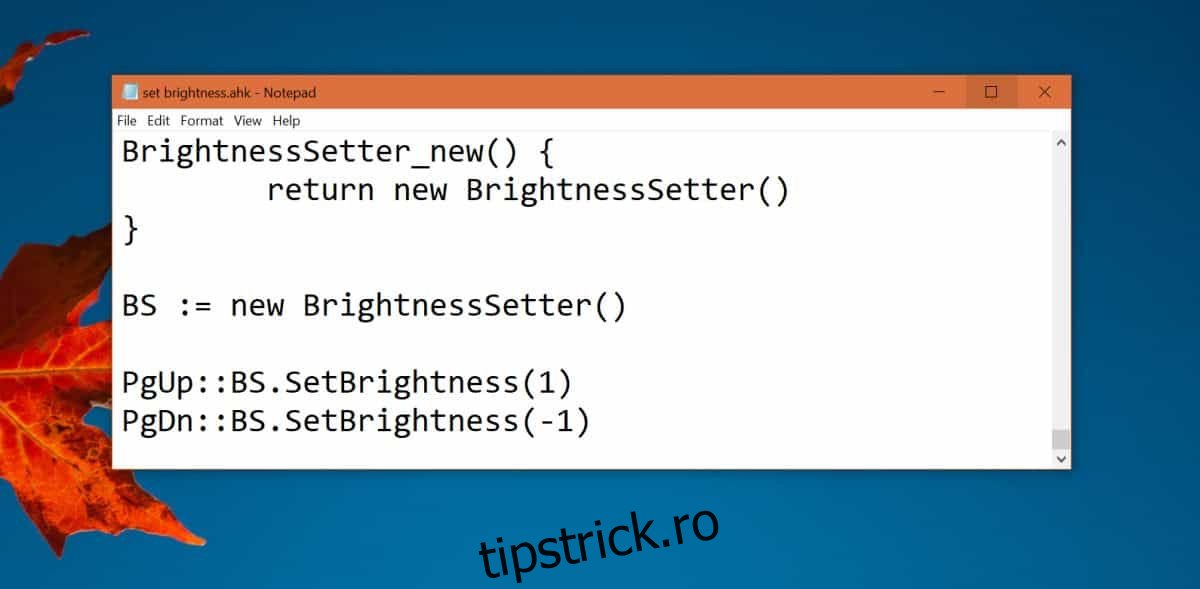
Salvați fișierul cu extensia .ahk și rulați-l. După ce scriptul rulează, puteți ajusta luminozitatea folosind tastele pe care le-ați configurat.